 |
||||||||||||||||
 |
 |
 |
 |
 |
 |
 |
 |
 |
 |
 |
 |
 |
 |
 |
 |
 |
 |
 |
 |
 |
 |
 |
 |
 |
|||||||||
 |
 |
 |
||
 |
||||
 |
||||
 |
 |
 |
||
 |
||||
|
Transmographier Modifier |
|
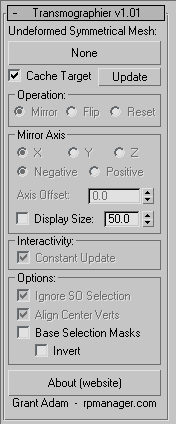
Transmographier Modifier The Transmographier is a modifier that aids in the process of creating morph targets for meshes (poly and trimesh). Rather than cutting, mirroring and welding the mesh as with the Symmetry modifier, it matches positions of existing vertices across the specified axis, so vertex ordering is never changed and morph targets continue to work. To do this, it needs a reference mesh: this reference needs to symmetrical across the desired axis in both vert count and vertex position. It does not need to be a perfectly symmetrial mesh but pretty close to it, especially in areas with high vertex density to avoid the wrong vertex pair being found - matching is by closest vertex and not absolute position so there is some tolerance for asymmetry.
The top pick button is what you use to pick your undeformed symmetrical mesh. The mesh you pick must have the same vertex count as the mesh you have applied this to - currently it does not filter for count, likely for version 1.01. Cache Target will not reload the undeformed mesh at each operation. Typically this will be left on. Update will update the cached undeformed mesh. Note that the cache survives saving and loading your scene. Operation - mirror will mirror the positions of vertices from one side of your mesh to the other. Operation - Flip will swap the vertex positions from one side to the other - mirror axis negative/positive make no sense for this mode and are disabled. Operation - Reset will move the verts to the undeformed meshes positions. Most useful when in SubObject mode when only certain vertices, say those accidentally moved and so interfering with morph targets, are to be reset. The Mirror Axis controls enable xyz and negative/positive mirror directions. Axis Offset allows you to modify where the mirror plane exists in relation to the object; usually it is best to have your pivot (and object offset) zeroed to the center of the object, bbut this allows you some flexibility in this area. Display + Size: these control whether the plane and direction of the mirror is displayed, and the size of the plane/direction arrow. interactivity - Constant update: with this off the result of the operations are cached. If you want to model underneath the Transmographier modifier turn this on else the Transmographier will not update with your changes. Options - Ignore SO selection: if you are in SO vertex mode the selection (including soft selections) is used to affect the result. If you are modelling below the Transmographier you will not want this, so turn this on to have it ignore any SO mode travelling up the stack. To reset small sections of your mesh (for fixing targets) you will want this off. Options - Align Center Verts: this option will re-align the verts detected as center verts (on the axis of the mirror/flip operation) back to the plane of the mirror, leaving the other transforms alone. Generally you will want these centre verts to not move in the axis of the mirror. Options - Base Selection Masks (+ invert): this option uses the vertex selection on the reference node to mask the result - specifically for situations where you might have a symmetrical head with asymmetrical hair as part of the same mesh, just select the head in vertex mode on the base node and turn on the option in the UI. Limitations - No support for Splines or Nurbs. Supported types are TriMeshes, (ie regular editable mesh stack), PolyMeshes, and PatchMeshes. Poly and Tri can be freely mixed if vertex counts are the same.
Transmographier is not freeware For licensees of RPManager and RPManagerLite, commercial or personal use is freely permitted. For everyone else there is a US$20 fee for commercial use per site. Personal, ie non-commercial use, is permitted without payment. There are no licenses, limited/demo versions or what-not, just this button here: which will get you a Thanks! email and the knowledge you are both supporting tool developers and legitimately using the plugin, and this link here: Download
Transmographier for 3dsmax 5, 6-8, 9, 2008, 2009- version 1.1 Transmographier for 2010 is available as zipped plugins - copy the unzipped plugin to your plugins directory: 3dsmax2010 32 bit 3dsmax2012 32 bit Commercial users: test it out for 30 days before you pay - while every effort will be made to make it bug-free and stable, there are no guarantees made and no responsibility taken by the developer for anything this plugin does to your scene(s). This is being used in production so it can't be all bad. Installation
instructions Contact bugs@rpmanager.com with any bug info. Scene files demonstrating problems are much easier to troublshoot. 64 bit 3dsmax9 version to come soon. Credits: Transmographier was written by Grant Adam, with input from BlendShape Maestro Avi Goodman.
|
 Demonstration Quicktime - 3.6 megs.