|
||||||||||||||||
 |
 |
 |
 |
 |
 |
 |
 |
 |
 |
 |
 |
 |
 |
 |
 |
 |
 |
 |
 |
 |
 |
 |
 |
 |
|||||||||
 |
 |
 |
||
 |
||||
 |
||||
 |
 |
 |
||
 |
||||
|
Spline Mesher Modifier |
|
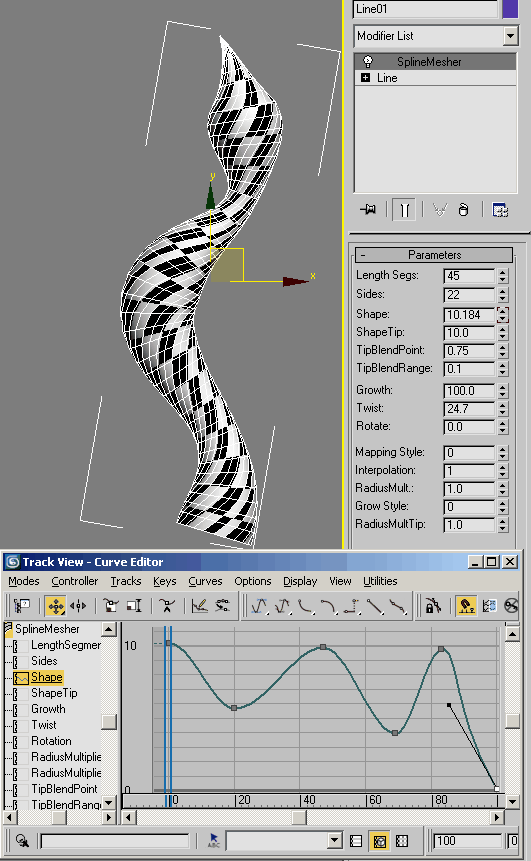
Spline Mesher Modifier A modifier that meshes a spline in much the same way as the Renderable Spline options in 3dsmax, but offers additional options like using a curve to control the shape. The curve used to control the shape is the animation curve assigned to the 'Shape' channel: it uses the values from 0 - 100 (regardless of any animation range in the scene) as percent along the curve. Watching the quicktime might make it clearer. Has a grow option, a second curve shape you can blend in, mapping options. No docs at the moment, most of the spinners should make sense but if you want to enable the seondary shape (which is the 'shape tip' channel) the set the 'Grow Style' to 1. You then use the 'Tip Blend Point' and 'Tip Blend Range' to control where and how softly the shape transitions from controlled by the first curve to the second.
Quicktime Movie: Quicktime Movie demonstrating SplineMesher 4000k Limitations: SplineMesher outputs a mesh, not a spline as renderable spline will do. If you want to use it as a spline consider making a reference of the original spline, and put SplineMesher on that (and then use the original spline for your spline stuff) SplineMesher is freeware Free for commercial or non-commercial use. Installation
instructions Update: version 1.1 New mapping option. With the 'Mapping Style' set to 2, the mapping is dragged along by the tip if you are using the 'Grow' options. Virtual Interpolation: with the segment value set low (or sharp angle changes in your spline) you could get flipping of the individual segments during animation: this setting controls additional calculations along the spline to elminate flipping (set it high enough so it stops). Interpolation options: New modes '2' and '3'. In both of these modes it only creates as many segments as there are spline segments, ie the number of knots in the spline will match the number of divisions in the result. The difference between the two is the interpolation method, same as between 1 and 2.
Update: version 1.2 New ribbon mode: Pick a target node and rather than a cylinder it creates a much lighter facing mesh. Typically you would pick your camera as the target node. Now works on multiple sub-splines within a single spline object. Version 1.1: 3dsmax9/2008 32 bit
- 1.1 Version 1.2: 3dsmax2012 32 bit
- 1.2 Contact bugs@rpmanager.com with any bug info. Scene files demonstrating problems are much easier to troublshoot. Credits: SplineMesher was written by Grant Adam. If you find SplineMesher useful and would like to show your appreciation feel free to use the button below. Thanks in advance :) |